How to Write a Prompt ChatGPT Actually Follows

- A followable prompt usually has four parts: a role, a specific task, a format, and any constraints that actually matter for the output.
- Adding a role changes more than tone -- it shifts what the model treats as relevant throughout the whole response, not just the opening line.
- Assuming context the model doesn't actually have is the single most common reason a prompt underperforms.
- A prompt that works once isn't proven -- test it against a second, meaningfully different input before trusting it.
- Follow-up messages can fix tone or length, but not a fundamentally wrong task -- restate the task clearly instead of iterating toward it.
Most bad ChatGPT output isn’t a model limitation — it’s a missing instruction. Ask “write me a cold email” and you’ll get something generic, because the model has nothing to work from except the two words “cold email.” Ask the same thing with a role, a specific recipient context, a length constraint, and a tone example, and the output changes completely, because now there’s actually something to follow. This guide covers the structural difference between those two prompts, not just “be more specific” as vague advice.
The four things a followable prompt actually has
Every prompt that reliably gets good output has some combination of these four elements. Not all four every time — but the ones that are missing are usually exactly why a specific output disappointed.
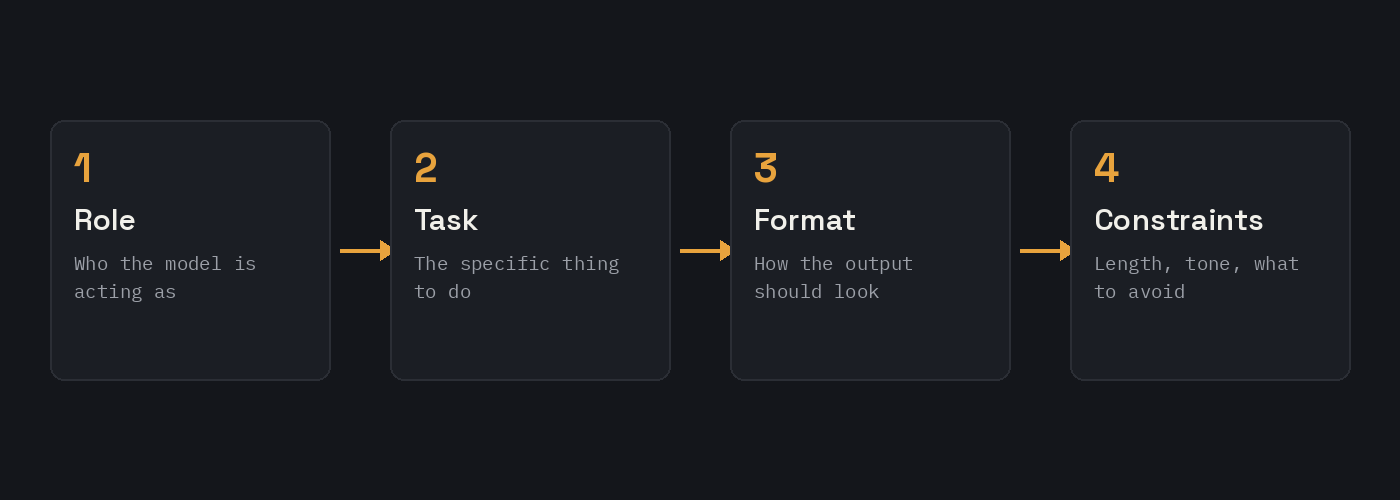
1. A role
“Act as a hiring manager reviewing resumes” changes the model’s frame of reference more than almost anything else you can add. Without a role, the model defaults to a generic, mildly helpful assistant voice. With one, it draws on the vocabulary, priorities, and judgment associated with that specific position. This matters more than it sounds like it should — a prompt with no role and a prompt with “act as a skeptical editor” produce genuinely different critiques of the same paragraph, not just a stylistic difference.
2. A specific task
“Help with my resume” is not a task. “Rewrite this bullet point to lead with a quantified result instead of a job duty” is a task. The difference is that the second one tells the model exactly what transformation to perform, rather than leaving it to guess what “help” means in this context — proofread it? Rewrite it? Just comment on it? Every one of those is a legitimate interpretation of “help,” which is exactly the problem.
3. Format
If you want a numbered list, say so. If you want three short paragraphs instead of one long one, say so. If you want a table, say so. ChatGPT does not know your intended use case for the output — whether it’s going into a slide, an email, or a document — so it defaults to whatever format seems most generically appropriate for the topic, which is frequently not what you actually wanted.
4. Constraints
Length limits, things to avoid, tone requirements, audience level — these are the details that turn a technically correct response into a genuinely usable one. “Explain this without jargon, for someone with no technical background” is a constraint that meaningfully changes word choice throughout the entire response, not just a stylistic footnote.
A before-and-after example
Before: “Write a follow-up email after a sales call.”
This produces a technically fine, completely generic email. It could be about any product, to any prospect, from any company. Nothing in the prompt gave the model anything specific to work with.
After: “Act as an account executive at a B2B software company. Write a follow-up email to a prospect after a discovery call where they mentioned budget approval happens at the end of the quarter. Keep it under 120 words, reference the budget timeline directly, and end with a specific next step rather than a generic ‘let me know if you have questions.'”
The second version has a role, a specific situational detail (budget timing), a length constraint, and an explicit instruction about how to close — and the resulting email is genuinely usable with minimal editing, rather than a draft that still needs the real content added in afterward.
Common mistakes that break an otherwise good prompt
- Assuming context the model doesn’t have. “Fix this like we discussed” means nothing to a fresh conversation — the model only knows what’s actually in the prompt or the conversation history, not what you’re picturing.
- Stacking too many unrelated asks in one prompt. “Write this email and also give me three subject line options and also check my grammar” tends to produce a worse version of all three than three separate, focused requests would.
- Vague quality words instead of concrete direction. “Make it better” or “more professional” are opinions the model has to guess at. “Remove contractions and passive voice, and cut it by a third” is an instruction it can actually execute.
- No format specified for output that clearly needs one. A comparison between two options that comes back as flowing prose, when a table would have made the actual differences immediately scannable, is a formatting miss, not a content miss.
Building a prompt from scratch: a walkthrough
Say the actual task is: get ChatGPT to help turn rough meeting notes into a clean list of action items. Starting from nothing:
Step 1 — name the task precisely. Not “help with my notes” but “convert these meeting notes into a list of action items, each with an owner and a rough timeframe if one was mentioned.”
Step 2 — add a role if it sharpens the output. “Act as an executive assistant preparing a follow-up summary” nudges the tone toward concise and professional rather than casual.
Step 3 — specify format. “Format as a bulleted list, one action item per line, bolding the owner’s name.”
Step 4 — add the one constraint that actually matters here. “If no owner was mentioned for an item, mark it as unassigned rather than guessing who it might be” — this single line prevents the single most common failure mode of this exact task, which is the model inventing a plausible-sounding owner that wasn’t actually in the notes.
Combined: “Act as an executive assistant preparing a follow-up summary. Convert the meeting notes below into a bulleted list of action items, each with an owner (bold their name) and a rough timeframe if one was mentioned. If no owner was mentioned for an item, mark it as unassigned rather than guessing. Notes: [paste notes here].” That’s a complete, followable prompt built from four deliberate additions, not a lucky first draft.
Testing and iterating
A prompt that works once isn’t necessarily a good prompt — run it against a second, genuinely different input before trusting it. If the meeting-notes prompt above works cleanly on a structured set of notes but falls apart on a messier, more rambling set, that’s useful information: the prompt might need an added instruction like “if the notes are unstructured, look for any sentence containing a task-like verb (send, follow up, review, schedule) as a signal of an action item,” rather than assuming the first clean result means the prompt is finished.
It’s also worth deliberately testing the failure case — feed the prompt an input with no clear action items at all, and see whether the model correctly says so, or invents items that aren’t really there. A prompt that handles the easy case well but hallucinates under the hard case isn’t actually reliable yet.
Who this actually matters for
Anyone using ChatGPT regularly for real work, not just casual one-off questions. The four-element structure here isn’t a rigid formula to follow every single time — plenty of quick questions don’t need a role or format spec at all — but for anything you’re going to reuse, share with a team, or rely on repeatedly, the difference between a prompt with these elements and one without them is usually the entire difference between output you can use directly and output that still needs real editing.
Refining through follow-up messages, not just the first try
A prompt doesn’t have to be perfect on the first attempt — ChatGPT keeps the conversation context, so a follow-up like “make the tone warmer” or “that’s too long, cut it to half the length” works on top of the original response rather than starting over. This matters because it changes how much pressure to put on getting the initial prompt exactly right: it’s often faster to write a reasonable first version and refine with one or two follow-ups than to spend five minutes perfecting a single message before sending it.
That said, follow-up refinement works best for adjusting tone, length, or format — if the actual task was wrong from the start (asking for a summary when what was really needed was a critique), a follow-up asking to “make it more critical” tends to produce a worse result than just restating the task clearly. Follow-ups fix execution problems; they don’t fix a fundamentally misdirected first prompt.
A second example, different domain, to show the pattern holds
The meeting-notes example above is a business task. Here’s the same four-element approach applied to something completely different — getting help understanding a technical concept.
Before: “Explain how neural networks work.”
This produces a reasonable but generic overview, pitched at whatever level the model guesses is appropriate, which is frequently either too simple or too technical for the actual reader.
After: “Act as a teacher explaining this to a high school student with no math background beyond basic algebra. Explain what a neural network actually does when it makes a prediction, using a concrete everyday analogy rather than mathematical notation. Keep it to about 4 paragraphs, and end with one sentence connecting the analogy back to how the network actually ‘learns’ from data.”
Same structure as the meeting-notes prompt — role (teacher), task (explain a specific mechanism, not the whole topic), format (4 paragraphs, analogy-based), constraint (no math notation, specific audience level) — applied to a completely different kind of request. The pattern isn’t specific to business writing; it’s a general structure for turning a vague ask into a followable instruction.
How much context is actually enough
There’s a real tension between giving the model enough background to work with and burying the actual instruction in too much surrounding detail. A useful rule of thumb: include context that changes what a good answer looks like, and leave out context that’s just backstory. For the sales-follow-up example earlier, the detail about budget approval timing changes what the email should actually say — that’s worth including. The fact that the call happened on a Tuesday afternoon almost certainly doesn’t change anything about the email’s content, so it’s just noise competing with the actual instruction for the model’s attention.
When in doubt, a reasonable test is to ask: if I removed this detail, would the ideal output actually be different? If yes, keep it. If the honest answer is “probably not,” it’s likely safe to cut, and the prompt will likely execute more precisely without it.
Save any prompt that ends up working well somewhere you can find it again — rewriting a good prompt from memory two weeks later rarely reproduces it exactly, and a saved, tested version is worth more than a rough one rebuilt from recollection. The Universal Prompt Builder is a reasonable way to apply this four-element structure directly if writing one from scratch each time feels slower than it should.
When you don’t know how much context to give
Sometimes the honest answer to “what context matters here” is that you’re not sure yet — the task is unfamiliar enough that you can’t tell what’s relevant. In that case, a genuinely useful move is asking the model to find out from you rather than guessing on your behalf: “Before you answer, ask me clarifying questions one at a time until you have what you need.” This works especially well for anything with several moving parts, where the risk of a generic answer is high and the cost of getting it wrong is a full rewrite rather than a small edit.
Getting output that doesn’t read as obviously AI-written
A prompt can be well-structured and still come back sounding stiff or generic — overly formal, hedgy, or padded with the kind of throat-clearing phrases nobody actually talks in. This is usually a missing constraint, not a model limitation: state the register directly (“write like you’re explaining this to a colleague, not presenting to a board”) and, if you have a few lines of your own past writing on the topic, paste them in and ask the model to match that voice specifically. Vague instructions like “sound more natural” tend to produce another flavor of generic; a concrete reference point works far more reliably than a general request for authenticity.
Further reading: OpenAI’s official prompt engineering guide and Google Gemini document how each model handles instructions differently.
FAQ
Do I need all four elements (role, task, format, constraints) in every prompt?
No — simple, one-off questions often don’t need any of them. This structure matters most for anything you’ll reuse repeatedly or where the output needs to be usable with minimal editing.
Why does adding a role change the output so much?
It shifts what the model treats as relevant and important, not just its tone — a role shapes vocabulary, priorities, and the kind of judgment calls the model makes throughout the whole response, not just the opening line.
What’s the single most common mistake in prompts that don’t work well?
Assuming the model has context it doesn’t actually have — referencing an earlier conversation, an unstated preference, or a document it hasn’t seen, without ever actually including that information in the prompt itself.
Should I always specify a strict word or length limit?
Only when length actually matters for the use case — an email or social post benefits from one, but a request for a thorough explanation of a complex topic can be hurt by an overly tight limit that forces the model to cut needed detail.
How do I know if a prompt actually works, or if I just got lucky once?
Test it against a second, meaningfully different input — especially an edge case or a messier version of the input type you expect to use most. A prompt that only works on the exact example you tested it with isn’t reliable yet.