The Complete Guide to Prompt Engineering: How to Write Prompts That Actually Work

- A strong prompt generally has five working parts, not just a single well-phrased sentence.
- Few-shot prompting -- showing examples rather than just describing what's wanted -- often outperforms a purely descriptive instruction.
- Your first attempt at a prompt is rarely the best version -- treating prompting as iterative produces better results than expecting a perfect first draft.
- Prompting conventions genuinely differ across ChatGPT, Claude, and Gemini -- the same wording doesn't always perform the same way on each.
- Creative tasks and technical tasks benefit from different prompt emphasis -- one favors open-ended direction, the other favors precise constraints.
Most people asking an AI model a question get a mediocre answer, and the reason is rarely that the model is limited — it is that the prompt gave it too little to work with. The gap between a forgettable AI answer and a genuinely useful one is almost never about which model you use. It is about how specifically you asked, how much real context you gave it, and whether you told it what the finished answer should actually look like. This guide covers exactly what separates those two outcomes, with a structure you can reuse on any prompt, for any model, starting today.
What Actually Makes a Prompt Work
Four things determine whether a prompt produces something useful or something generic, and none of them are about clever wording or magic phrases.
Specificity beats vagueness, every time. “Write a blog post about marketing” and “write a 600-word blog post explaining email segmentation for a small e-commerce owner who has never used it before” will produce dramatically different results from the same model, because the second version tells it exactly who the reader is, what they already know, and what the piece needs to accomplish. The model is not guessing at your intent in the second case — it already has it.
Context matters more than clever phrasing. A model has no memory of your business, your audience, or your goals unless you tell it in the prompt itself. Two sentences of real background — who this is for, what has already been tried, what the constraint is — routinely improve output more than an extra hour spent wordsmithing the instruction itself.
Format instructions remove guesswork. If you want a table, say table. If you want three bullet points and nothing else, say that. Without an explicit format instruction, the model defaults to whatever structure it judges most likely to be useful, which is often not what you actually wanted.
Constraints focus the model instead of restricting it. A prompt with no constraints tends to produce a safe, average answer, because the model has no signal for what “good” specifically means in this case. Telling it what to avoid, what length to stay under, or what tone to avoid is not limiting the model — it is the fastest way to rule out the generic answer and get to a sharper one.
The Five-Part Structure of a Strong Prompt
Almost every prompt that consistently produces good output follows some version of this structure, whether or not the person writing it thought of it this way:
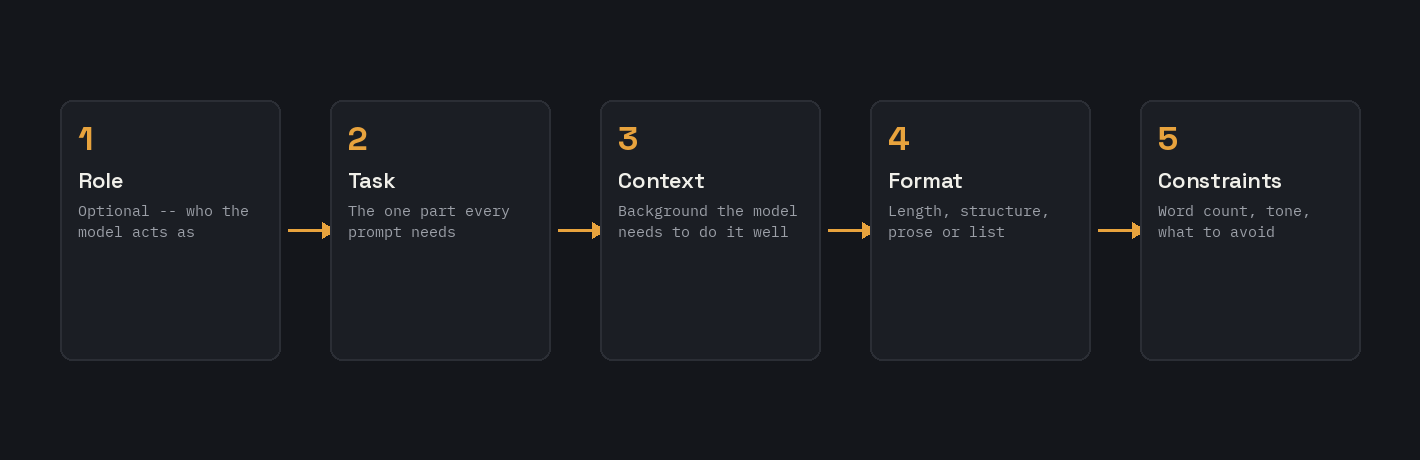
- Role (optional): who the model should act as — “act as an experienced copywriter,” “act as a patient tutor.” Useful when a specific perspective or expertise level changes the answer, skippable when it doesn’t.
- Task: the actual thing you want done, stated as directly as possible. This is the one part every prompt needs.
- Context: the background the model needs to do the task well — audience, prior attempts, constraints that exist for reasons outside the prompt itself.
- Format: what shape the answer should take — length, structure, whether you want prose or a list, whether you want an explanation alongside the answer or just the answer alone.
- Constraints: what to include, what to avoid, and any hard limits (a word count, a reading level, a tone to stay away from).
Not every prompt needs all five parts spelled out explicitly, but a prompt that is producing weak results is very often missing one of them silently — usually context or constraints, since task and format tend to get stated by habit while the other two get assumed.
Few-Shot Prompting: Teaching by Example
For any task with a specific, repeatable shape — classification, extraction, matching a particular tone or format — showing the model one or two examples of exactly what you want usually outperforms describing it in words alone. This is called few-shot prompting, and it works because an example removes ambiguity that a written description often cannot: exact formatting, exact level of detail, exact tone.
A single example already helps significantly over zero. Two examples that cover genuinely different cases, not two nearly identical ones, usually captures the pattern well enough for most tasks. Beyond three or four examples, the benefit tends to flatten out, so there is rarely a reason to include more than that.
The examples also need to be clearly delimited from each other and from the instruction itself — a labeled Input/Output pair, or an XML-tagged example block, reads far more reliably to a model than the same content buried in a paragraph. The Few-Shot Example Formatter on this site builds that structure automatical
Chain-of-thought: asking the model to reason before it answers
Few-shot teaches by example; chain-of-thought works differently — it asks the model to work through its reasoning step by step before giving a final answer, rather than jumping straight to a conclusion. This matters most for anything with multiple steps or a real chance of a careless error: math, multi-step logic, debugging, or any decision that depends on getting an earlier step right before a later one makes sense. A simple version of this is just adding “think through this step by step before giving your final answer” to a prompt that’s currently getting rushed, shallow responses to a genuinely non-trivial question. The tradeoff is length — a chain-of-thought response is longer and slower to read than a bare answer, so it’s worth reserving for tasks where the reasoning itself is useful to see (you can catch a wrong assumption partway through) rather than using it on every prompt by default.
Why Your First Prompt Is Rarely Your Best One
Prompting works best treated as a short conversation, not a single perfect attempt. The first response tells you something specific about what the model misunderstood or lacked, and that information is exactly what the next prompt should fix — rather than starting over from scratch with a longer, more complicated version of the original.
When an output comes back wrong, it is worth diagnosing which of the five parts above was actually missing before rewriting anything. An answer that is technically correct but generic usually means the context was too thin. An answer with the wrong structure usually means format was never stated. An answer that ignores something important usually means it was buried in a paragraph rather than stated as an explicit constraint. Fixing the specific gap tends to work better than a full rewrite of the prompt from zero.
It also helps to separate genuinely different jobs into separate prompts rather than asking for everything in one message. A prompt asking a model to research, then analyze, then write a polished final draft all at once tends to produce shallower results at every stage than the same three jobs handled as three focused, sequential prompts. The Prompt Chaining Workflow Builder is built specifically for breaking a complex task into that kind of sequence.
Prompting Differently Across ChatGPT, Claude, and Gemini
The core structure above (task, context, format, constraints) works across every major model, but each has its own tendencies worth knowing. Claude tends to follow explicit structure — especially XML-style tags separating task from context or format — more literally than the other two, which makes tagged prompts a particularly good fit for it. ChatGPT is generally the most forgiving of plain, conversational prose, though it still benefits from an explicit format instruction if you care about the shape of the answer. Gemini tends to reward direct, unhedged phrasing, and for anything involving current events or real-time information, it is worth explicitly asking it to search first rather than assuming it will do so automatically.
None of this means one model is better at prompting than another — it means a prompt that works well on one is not automatically optimized for a different one. The Multi-Model Prompt Converter takes a single prompt and adapts it for all three at once, applying exactly these differences rather than pasting the same text into each unchanged.
Common Mistakes That Weaken a Prompt
A handful of patterns show up constantly in prompts that underperform, and every one of them is fixable without rewriting the whole thing:
- Being vague where specificity was possible. “Make this better” gives a model nothing to aim at. “Tighten this to under 100 words and make the opening line punchier” gives it an actual target.
- Assuming context the model does not have. The model does not know your audience, your brand voice, or what you already tried unless the prompt states it directly, every single time.
- Overloading one prompt with several distinct jobs. Research, analysis, and final writing crammed into a single instruction usually produces a shallower version of all three than three separate, focused prompts would.
- Never specifying the output format. If the shape of the answer matters to you, it needs to be stated — the model will not know to guess a table over a paragraph unless told.
- Treating the first response as final. The first output is often a diagnostic tool more than a finished answer — what it gets wrong tells you exactly what the next prompt needs to fix.
A Simple Framework You Can Reuse Every Time
Before sending a prompt, it is worth running it against a short checklist: does it state the task directly, without hedging? Does it include the specific context the model would otherwise have to guess at? Does it say what shape the answer should take? Does it name at least one real constraint — a length, a tone to avoid, something that must be included? If the answer to any of those is no, that is usually the exact gap causing a weak result, and it is worth fixing before sending rather than after seeing a mediocre answer come back.
This checklist is deliberately the same five-part structure covered earlier — role, task, context, format, constraints — because that structure is not a one-time lesson, it is a repeatable habit. The prompts that consistently perform well are not the ones written by naturally gifted prompt writers; they are the ones built from this same checklist every time, whether or not the person writing them thinks about it explicitly.
A Worked Example: Turning a Weak Prompt Into a Strong One
Abstract principles are easier to apply once you have seen them fix an actual weak prompt, so here is one walked through step by step.
Weak version: “Write something for my Instagram about my new candle business.”
This prompt has a task, technically, but nothing else. There is no audience, no idea what the candles are actually like, no format instruction, and no constraint on tone or length. A model given only this will produce a generic, forgettable caption that could describe almost any small candle business, because it has been given nothing specific to work with.
Applying the five parts:
- Task: write an Instagram caption announcing a new product line.
- Context: the business makes small-batch soy candles in unusual scent combinations (like fig and black pepper), aimed at people who find typical vanilla/lavender candles boring; this is the first post about a new autumn scent.
- Format: a caption under 150 words, with a hook in the first line before the “more” cutoff, short line breaks rather than one dense paragraph.
- Constraint: playful tone, no generic phrases like “we’re so excited to announce,” end with a specific question to drive comments.
Strong version: “Write an Instagram caption under 150 words announcing a new autumn candle scent for my small-batch soy candle business. We make unusual scent combinations, like fig and black pepper, for people bored of typical vanilla and lavender candles — this new one combines toasted hazelnut and dark plum. Playful tone, short line breaks rather than dense paragraphs, a hook in the first line, no generic phrases like ‘we’re so excited to announce.’ End with a specific question about what scent combination people want to see next.”
The task did not fundamentally change between these two versions — the underlying ask is still “write me a caption.” What changed is that the model now has an actual audience, an actual product detail, an actual format, and an actual tone to work from, instead of having to invent all four on its own and land somewhere generic.
Prompting for Creative Work Versus Technical Work
The five-part structure applies to both, but the parts carry different weight depending on which kind of task you are prompting for. Creative writing, art prompts, and brainstorming tend to lean heavily on context and constraint — a specific mood, a specific audience, a specific thing to avoid — since the “correct” answer is genuinely open-ended and the model needs a clear creative direction rather than a rigid format to fill in. Technical tasks — code, data extraction, structured output — lean more heavily on format and constraint specifically, since there is often exactly one shape the answer needs to take, and a vague format instruction is far more costly here than in a creative task, where some variation is expected and even welcome.
A useful rule of thumb: for creative tasks, spend most of your prompt-writing effort on context (who, what mood, what makes this specific instance different from a generic version of the same request). For technical tasks, spend most of that effort on format and constraints (exact structure, exact naming conventions, exact edge cases to handle). Task and role matter in both cases, but they are rarely where a technical or creative prompt actually goes wrong.
Tools on This Site That Help You Build Better Prompts
Several tools on GenPrompto are built directly around the principles in this guide, rather than being generic templates. Working through one of these tools is often a faster way to internalize the five-part structure than reading about it, since the form itself forces you to fill in each part before it will generate anything.
- The Universal Prompt Builder walks through the five-part structure directly, field by field.
- The Prompt Optimizer/Rewriter takes a weak prompt and rebuilds it against these same principles.
- The System Prompt Generator applies this structure to a standing system prompt for a custom GPT, Claude Project, or AI agent, rather than a one-off message.
- The Few-Shot Example Formatter and JSON Schema Prompt Formatter handle the more technical end of prompt structure, for pattern-matching and structured-output tasks specifically.
Each is built to produce a prompt you paste directly into ChatGPT, Claude, or Gemini — not to replace the thinking in this guide, but to make it faster to apply consistently.
What practices are beneficial for training AI models with prompts?
The practices that matter most are instruction clarity (state the task and constraints explicitly rather than implying them), example diversity (cover edge cases and varied phrasing, not just the easy cases), avoiding leading or biased phrasing (don’t phrase a prompt so it steers toward one answer), and iterative refinement (test, check where responses go wrong, and adjust the instruction rather than the individual example). These apply whether you’re writing prompts for everyday use, building a few-shot example set, or assembling an instruction dataset for fine-tuning — the difference is mainly how systematically you apply them.
FAQ
What is prompt engineering, in plain terms?
It is the practice of structuring an instruction to an AI model so it has enough specificity, context, and format guidance to produce a genuinely useful answer, rather than a generic one built on guesswork.
Do I need to learn special syntax or “magic words” to write good prompts?
No — the structure that actually matters (task, context, format, constraints) is plain language, not special syntax. A few technical patterns like XML tags help with specific models or specific tasks, but they are a refinement, not the foundation.
How long should a good prompt be?
As long as it needs to be to cover task, relevant context, and format — often a few sentences, sometimes a short paragraph. Length is not the goal; covering the parts that are actually missing is.
Should I write one long prompt or break tasks into steps?
For a single, well-defined task, one clear prompt is fine. For anything genuinely multi-stage — research, then analysis, then final writing — breaking it into a sequence of focused prompts consistently produces better results than one prompt trying to do everything at once.
Does the same prompt work equally well on ChatGPT, Claude, and Gemini?
The core structure transfers, but each model has its own tendencies worth adjusting for — Claude responds especially well to explicit tagged structure, and Gemini benefits from direct phrasing and an explicit instruction to search for time-sensitive topics.
What practices are beneficial for training AI models with prompts?
Instruction clarity, diverse examples that cover edge cases, avoiding leading or biased phrasing, and iterative refinement based on where responses actually go wrong — see the section above for how each applies in practice.
