How to Use AI at Work: A Complete Guide for Every Department

- Generic "use AI for productivity" advice fails because it doesn't tell a specific role what to actually do differently on a given day.
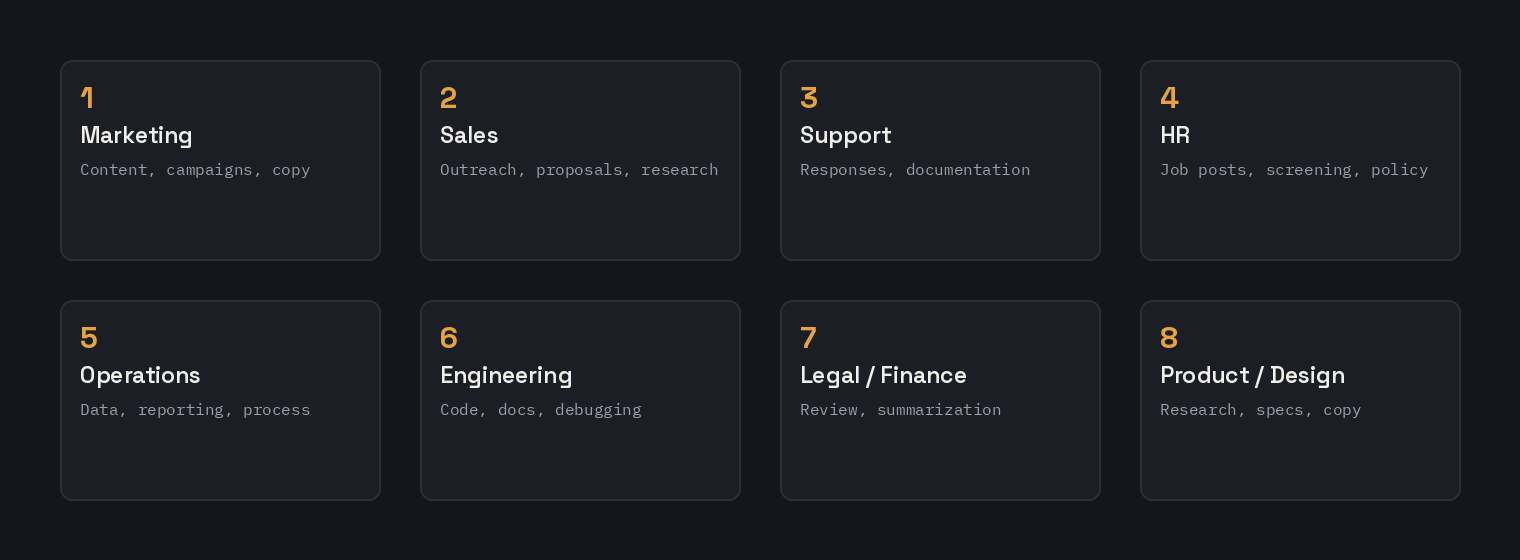
- Different departments benefit from AI in genuinely different ways -- marketing, support, HR, engineering, and legal/finance all have distinct use cases, not one shared playbook.
- Rolling out AI at work has common, predictable failure points worth planning around before they happen, not after.
- Team-wide adoption depends more on buy-in and habit-building than on picking the right tool.
- Measuring whether AI adoption is actually working requires defining what "working" means for that specific team first.
Most “how to use AI at work” advice stays so general it could apply to any job, which is exactly why it rarely gets used — a vague suggestion to “use AI for productivity” gives a marketing coordinator and a data analyst nothing different to actually do on Monday morning. This guide breaks that down by department instead, with specific, real workflows for the tasks each role actually spends time on, not a generic pep talk about AI transforming the workplace.
Marketing and Content Teams
Marketing teams tend to get the most immediate, concrete value from AI tools, since so much of the work is repeatable writing with a clear structure — a blog post, a social caption, an ad, a subject line — rather than open-ended judgment calls. The highest-leverage starting point is building a small library of reusable prompt structures for the content types your team produces weekly, rather than starting from scratch with every single post.
A realistic weekly workflow: use a Blog Outline Prompt Generator to structure a post before writing a single sentence of the draft, generate ad variations with the Ad Copy Prompt Generator to test more than one angle before committing budget, and use the SEO Meta Description Prompt Generator so every published page gets a properly sized, click-worthy description instead of an afterthought written in thirty seconds. For social specifically, the LinkedIn Post and Instagram Caption/Bio generators handle the platform-specific formatting differences that a single generic caption prompt tends to miss.
Sales and Business Development
Sales teams benefit most from AI in the parts of the job that are repetitive but still need to feel personal — outreach, follow-ups, and objection handling — where a templated message gets ignored but a fully custom message for every single prospect does not scale. The goal is not replacing the human judgment in a sales conversation, it is removing the blank-page problem before every single email.
A realistic workflow: use the Cold Email Prompt Generator to build a strong first-touch structure once, then adapt the specific value proposition and personalization detail per prospect rather than rewriting the whole email from nothing each time. For LinkedIn-based outreach specifically, the same discipline of leading with a real value proposition rather than a generic introduction applies just as much to a LinkedIn message as it does to email.
Customer Support Teams
Support teams have two genuinely different AI use cases that are worth treating separately: AI-assisted drafting for a human agent to review and send, and a fully automated first-line assistant answering common questions directly. The first is lower-risk and easier to roll out immediately; the second needs real guardrails before it should touch real customers.
For an automated or semi-automated support assistant, the System Prompt Generator is directly relevant — it is built specifically around stating not just what the assistant can do, but what it must never do (share another customer’s data, offer a refund unilaterally, give legal advice), which is exactly the kind of guardrail a support-facing AI needs stated explicitly rather than assumed. For agents drafting responses with AI assistance rather than full automation, the same core discipline applies at a smaller scale: give the model the actual customer message and account context, not just a generic description of the situation.
HR and Recruiting
HR and recruiting teams touch AI most often around job postings, screening, and interview preparation — all tasks with a real structure that benefits from consistency across candidates, which is also where fairness and legal considerations matter most. AI can meaningfully speed up the mechanical parts of this work without replacing human judgment on who to actually hire.
A realistic workflow: use the Interview Question Prompt Generator in its hiring-manager mode to build a consistent, structured question set per role, rather than improvising different questions for different candidates in a way that makes comparison harder and introduces more room for bias. On the candidate-facing side of this same tool, job seekers going through your process can use the same generator to prepare, which is worth knowing since applicants increasingly do exactly this.
Operations and Data-Heavy Roles
Operations, finance, and analyst roles tend to spend real time on two specific technical tasks where AI assistance has a clear, immediate payoff: writing SQL queries against a database, and building or debugging spreadsheet formulas. Both are tasks with a precise correct answer, which makes them a strong match for AI assistance compared to more open-ended creative work.
The SQL Query Prompt Generator and Excel Formula Prompt Generator are both built specifically around this — providing real schema or data-layout details rather than a generic request, which is what separates a query or formula that works on the first try from one that needs three rounds of correction. For anyone regularly estimating the cost of an AI-powered internal tool or workflow, the AI Cost/Token Estimator is worth using before committing to a specific approach at scale.
Engineering and Development Teams
Engineering teams already tend to be the most AI-fluent department in most companies, but the gap between casual use and genuinely reliable use usually comes down to structure — a well-formed prompt with real context about the codebase and constraints, versus a bare “write me a function that does X” with no surrounding detail.
Beyond general-purpose coding assistance, a few specific technical prompt patterns are worth building into a team’s habits: the JSON Schema Prompt Formatter for anything feeding AI output directly into another system, the Regex Generator for pattern-matching tasks that are easy to get subtly wrong, and the Prompt Chaining Workflow Builder for any pipeline task (extract, then transform, then generate) that performs better broken into stages than handled in a single overloaded prompt.
Legal, Finance, and Compliance Teams
These teams tend to be the most cautious about AI adoption, and reasonably so — the cost of a confidently wrong answer is much higher here than in a marketing draft that gets reviewed before publishing anyway. That does not mean AI has no place in these roles, but it does mean the use cases that make sense look different: drafting a first pass of a routine document for a human expert to review and correct, rather than generating anything that goes out under the organization’s name without a qualified review step.
A realistic, lower-risk starting point: using AI to summarize a long document into key points for faster human review, drafting a first pass of a routine, low-stakes communication, or building structured queries against internal financial data with a tool like the SQL Query Prompt Generator, always reviewed by someone with the actual expertise to catch an error before it matters. The instinct to be more cautious in these functions specifically is a reasonable one, not a sign of falling behind — it reflects the actual stakes of the work.
Product and Design Teams
Product managers and designers tend to use AI most heavily in the earlier, more exploratory parts of their work — turning a rough feature idea into a structured spec, drafting user stories, or generating a first pass at UX copy before a designer refines it by hand. The common thread across these use cases is that AI is doing first-draft structuring work, freeing up human time for the judgment calls that actually require it: what the feature should really do, and how it should feel to use.
A realistic workflow: use a System Prompt Generator-style structured approach to turn a rough product idea into a clearly scoped spec with explicit constraints before it goes to engineering, which tends to surface ambiguity and missing detail earlier than a looser, prose-only spec would. For anything involving a sequence of distinct steps — research a competitor, then synthesize findings, then draft a recommendation — the Prompt Chaining Workflow Builder keeps each stage f
Checking what your company actually allows before you start
This matters enough to say plainly, before any department-specific advice: check your company’s actual policy on AI tools before putting real work data into one, not after. Standard consumer-tier ChatGPT, Claude, and Gemini accounts generally aren’t built for confidential business data — client names, unreleased financials, proprietary code, anything covered by an NDA — unless your organization has specifically confirmed the plan you’re using has appropriate data handling guarantees for that kind of information. Many companies now have an explicit AI policy or an approved enterprise tier for exactly this reason; if yours doesn’t yet, that’s worth raising directly rather than assuming silence means it’s fine. The fastest way to lose trust in an AI rollout is a data-handling mistake in month one, not a mediocre first prompt.
ocused rather than producing a shallower version of all three at once.
Common Mistakes When Rolling Out AI at Work
- Treating “use AI” as a one-time announcement rather than a habit. A single training session rarely changes daily behavior — teams that actually adopt AI well tend to build a small, specific set of reusable prompts for their most common tasks, not a general encouragement to experiment.
- Automating a customer-facing process before the guardrails are actually tested. Anything touching real customers directly deserves the same restrictions-and-fallback thinking covered in the support section above, tested deliberately before launch, not discovered after a bad interaction.
- Assuming one department’s workflow transfers to another. A prompt structure that works well for marketing content rarely transfers cleanly to a legal or technical use case with much less tolerance for a plausible-sounding wrong answer.
- Ignoring data handling policy for anything sensitive. Before pasting real customer data, financial figures, or unreleased product details into any AI tool, it is worth confirming your organization’s actual policy on this, since default settings vary by platform and by subscription tier.
Getting Buy-In and Building Team-Wide Habits
The teams that get the most out of AI tools long-term are rarely the ones with the most enthusiastic individual users — they are the ones that build a small, shared set of reusable prompts for the specific tasks the team repeats every week, so a new team member does not have to reinvent a working approach from scratch. Documenting the two or three prompts your team actually uses regularly, with real examples of good output attached, tends to spread adoption far more effectively than a general announcement that AI tools are now available for anyone to try.
It is also worth being genuinely honest with a whole team about specifically where AI actually saves real time and where it does not yet, even after real effort. Overselling AI as a solution to every workflow problem creates disappointment and skepticism when it inevitably falls short on a task it was never well-suited for, while being specific about the handful of tasks where it reliably helps builds trust that compounds as more of those specific use cases get identified over time.
Measuring Whether AI Adoption Is Actually Working
It is remarkably easy to roll out AI tools across an entire team and never actually check carefully whether they are genuinely helping, since usage itself often feels like real progress even when it is not translating into any actual time savings or measurably better output. A few concrete signals are worth tracking rather than assuming: whether the same task genuinely takes less time than it did before, whether the quality of first-draft output has actually reduced the number of revision rounds needed, and whether specific team members have stopped using a tool after initial enthusiasm, which usually signals it was not solving a real problem for their actual workflow.
It is also worth distinguishing between individual habit and team-wide capability. A single enthusiastic early adopter getting genuine real value from AI tools on their own does not necessarily mean the whole broader team has actually adopted anything durable yet — the more meaningful signal is whether a new team member, handed the team’s documented prompt library, can reproduce similar quality output without months of individual trial and error first. That transferability is a better measure of successful adoption than raw usage statistics or anecdotal enthusiasm from the most engaged individual users.
Finally, it is worth periodically revisiting which specific use cases are actually delivering value, since this shifts over time as both the tools and the team’s familiarity with them improve. A workflow that felt like a genuine unlock six months ago might now be table stakes, while a use case dismissed early as not worth the effort might be worth revisiting as underlying models and the team’s own prompting skill both continue to improve.
Which Department Should Go First?
Organizations rolling out AI tools company-wide often make the mistake of trying every department at once, which spreads attention too thin to build real momentum anywhere. A more effective sequence usually starts with whichever department has the most repeatable, lowest-stakes writing tasks — marketing and content teams are the most common starting point for exactly this reason, since the work is genuinely repeatable and a weak first draft is caught in review before it goes anywhere important.
Once one department has a documented, working set of prompts and has actually measured a real time savings, that proof point tends to build far more genuine buy-in from other departments than any top-down mandate would. A finance or legal team skeptical of AI adoption in the abstract is often much more receptive once they can see a concrete, measured example from elsewhere in the same organization, rather than an abstract pitch about AI’s potential.
Tools for Every Department
This site’s full tool library covers well over fifty free, no-signup generators spanning every department above, from sales outreach to data queries to support automation. For anyone just starting to build AI habits into their own role, the Complete Guide to Prompt Engineering covers the underlying structure that makes every one of these department-specific workflows actually work well, rather than producing generic output.
FAQ
Which department benefits most from AI tools?
Marketing and content teams tend to see the fastest, most obvious wins, since so much of the work is genuinely repeatable writing with a clear underlying structure. That said, every single department covered in this guide has at least one specific, high-value use case once the actual workflow is matched carefully to the daily task at hand.
Is it risky to let customer support use AI directly with customers?
Fully automated customer-facing AI needs real, tested guardrails — explicit restrictions on what it must never do, deliberately tested before launch against real edge cases — while AI-assisted drafting reviewed by a human agent before sending is much lower risk overall and a genuinely reasonable starting point for most teams new to this.
How do we get a whole team to actually use AI tools consistently?
Build and document a small, specific set of reusable prompts for the tasks your team repeats weekly, with real examples attached, rather than a general announcement that AI tools are available. Adoption tends to follow specific, proven workflows more than general encouragement.
Should every department use the same AI tools and prompts?
No — a prompt structure that works genuinely well for marketing content often does not transfer cleanly at all to a technical or HR context, where the stakes and the tolerance for a plausible-sounding wrong answer are both very different. Department-specific workflows, like the ones covered throughout this guide, consistently tend to work better in practice than any single one-size-fits-all approach applied uniformly across a whole organization.
What is the biggest risk when rolling out AI at work?
Pasting sensitive data (customer information, financial figures, unreleased product details) into a tool without first checking your organization’s actual current data-handling policy, and automating a customer-facing process before its guardrails have been genuinely and thoroughly tested against real edge cases.