The Beginner’s Guide to AI Image Generation: Midjourney, DALL-E, and Stable Diffusion Explained
- Midjourney, DALL-E, and Stable Diffusion each have genuinely different strengths -- picking the right one matters as much as the prompt itself.
- A strong image prompt has four core elements: subject, style, lighting, and composition -- missing any of them is the most common reason a result feels generic.
- DALL-E (via ChatGPT) tends to follow detailed prompts most precisely and handles in-image text best.
- Midjourney uses its own parameter syntax (like --ar and --stylize) rather than plain natural language alone.
- What matters most shifts by subject -- lighting and expression carry portraits, while composition and material detail carry product shots.
Picking an AI image generator is confusing mostly because the marketing around all three major tools sounds nearly identical, while the actual experience of using them is genuinely different — different strengths, different prompt conventions, and different learning curves. This guide explains how AI image generation actually works in plain language, breaks down what Midjourney, DALL-E, and Stable Diffusion are each genuinely best at, and covers the prompt structure that turns a lucky one-in-ten result into a consistent, controlled one.
How AI Image Generation Actually Works
Modern AI image tools are trained on truly enormous numbers of image-and-caption pairs gathered from across the internet, learning statistical associations between specific words and visual patterns — what “a golden retriever” tends to actually look like, what “watercolor style” tends to look like, and critically, how all of these learned patterns combine together into something new. When you write a prompt, the model is not searching for an existing photo or illustration that matches; it is generating a new image from scratch based on the patterns it learned, guided step by step toward something that fits your description.
This matters quite practically because it explains directly why vague prompts tend to produce inconsistent results: the model genuinely has many different valid ways to satisfy the same vague description, and which one it actually picks on any given attempt is partly a matter of randomness built into the process. A specific prompt narrows that range of valid interpretations, which is why the same core structure (subject, style, lighting, composition) covered later in this guide improves results across all three tools, not just one.
Midjourney: Strengths and Style
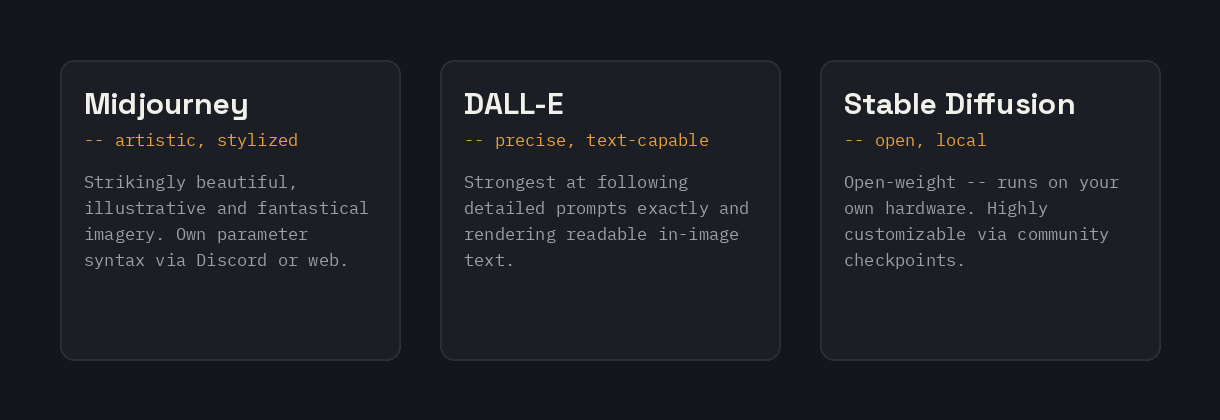
Midjourney has built its reputation on distinctly artistic, often strikingly beautiful output, particularly for stylized, illustrative, and fantastical imagery. It tends to produce images with strong composition and lighting even from relatively short prompts, which makes it a popular choice for concept art, book covers, and stylized portraits where a painterly or illustrative quality is the goal rather than strict photorealism.
Midjourney is accessed primarily through Discord (with a web interface also available) and uses its own specific parameter syntax appended to a prompt — flags like –ar for aspect ratio and –stylize for how strongly it leans into its default aesthetic rather than following your description literally. The Midjourney Prompt Generator on this site is built specifically around this parameter syntax, rather than generic natural language alone.
DALL-E: Strengths and Style
DALL-E, accessed through ChatGPT‘s image generation feature, tends to be the strongest of the three at following a detailed prompt precisely and at rendering readable text within an image, which is a genuinely difficult capability for most image models and a common point of failure elsewhere. It also handles conversational refinement well — describing a change to a previous result in plain language, rather than rewriting the whole prompt from scratch, tends to work reliably.
DALL-E’s accessibility inside ChatGPT’s regular chat interface makes it the easiest entry point for someone who does not want to learn a separate tool or platform-specific syntax first. The DALL-E Prompt Generator on this site is built around its natural-language-first conventions.
Stable Diffusion: Strengths and Style
Stable Diffusion is meaningfully different from the other two in one key way: it is open-weight, meaning it can be run on your own hardware rather than exclusively through a hosted service, and it has spawned a large ecosystem of community-trained variations and add-ons for specific styles, characters, or capabilities that do not exist for the other two tools. This makes it the most flexible and customizable option, at the cost of a steeper setup and learning curve for anyone not using one of the many hosted interfaces built on top of it.
Stable Diffusion tends to be the choice for anyone who wants fine-grained control — specific community-trained styles, local processing without sending images to a third party, or integration into a custom pipeline or application. The Stable Diffusion Prompt Generator on this site covers its particular prompt weighting and negative-prompt conventions.
Key Terms Every Beginner Should Know
- Aspect ratio: the width-to-height shape of the generated image (square, portrait, widescreen), usually set with a specific flag or setting depending on the tool.
- Negative prompt: a separate list of things you do not want to appear, used to rule out common unwanted elements (extra fingers, watermark-like text, an unwanted style) rather than trying to describe their absence in the main prompt. The Negative Prompt Generator on this site is built specifically around this.
- Style weight or stylize value: how strongly a tool leans on its own default aesthetic versus following your description literally — a higher value in Midjourney specifically produces more stylized, less literal results.
- Seed: a number that controls the initial randomness of a generation — reusing the same seed with a slightly modified prompt is how you make a small, controlled change rather than getting a completely different image.
- Img2img or image-to-image: generating a new image guided by an existing one as a starting reference, rather than starting from text alone.
How to Write a Strong Image Prompt
The same underlying structure improves results across all three tools: a specific subject, an art style, lighting, and composition. “A woman” produces something generic; “an elderly lighthouse keeper looking out over a stormy sea, oil painting style, moody lighting, wide establishing shot” gives the model an actual scene to render rather than an open-ended guess. The Art Prompt Generator on this site is built directly around this structure, written in plain natural language rather than any single platform’s parameter syntax, so it works as a starting point regardless of which specific tool you end up using.
Mood and color palette are worth adding once the core structure is in place — they are optional, but they sharpen a result meaningfully once the subject, style, lighting, and composition are already specific. A prompt missing all four of these elements is the single most common reason a result feels generic rather than deliberate.
Prompting Differently for Portraits, Products, and Landscapes
The core structure (subject, style, lighting, composition) applies everywhere, but which part matters most shifts depending on what you are generating. For portraits, lighting and expression carry most of the weight — naming a specific lighting setup (soft studio lighting, golden hour, moody and dramatic) and a specific mood or expression tends to matter more than fine-grained detail about clothing or background, which the model will fill in reasonably well on its own once the mood is established.
For product-style images — something meant to look like a clean commercial photo of an object — composition and background become the highest-leverage details. Specifying a plain, neutral, or branded-colored background, a specific angle (three-quarter view, straight-on, overhead), and clean, even lighting produces a far more usable commercial-style result than a prompt focused mainly on the object’s appearance alone, since the model already handles rendering a described object reasonably well and the setting is what separates a usable product shot from a generic one.
For landscapes and environments, atmosphere and time of day tend to be the most valuable details to specify — fog, golden hour, storm clouds, or a specific season change the entire feel of a scene more than small compositional details do. Naming a specific real or fictional location type (a Scottish highland valley, an overgrown urban ruin, a Japanese torii gate at dusk) also anchors the result much more concretely than a generic description like “a nice landscape.”
Understanding Copyright and Commercial Use
Before ever using an AI-generated image for any commercial purpose, it is genuinely worth understanding two separate and distinct questions that often get conflated with each other, even though they are not actually the same thing: whether you are allowed to use the image commercially under the specific platform’s terms of service, and whether the image itself might raise a copyright concern — for instance, if the prompt specifically asked for a real, named artist’s style, or if the output closely resembles a specific existing copyrighted character. Terms of service vary by platform and by subscription tier, and they do change over time, so checking the current terms for whichever tool you are using is worth doing before committing to a commercial project rather than assuming a blanket answer applies everywhere.
A separate, entirely practical consideration worth keeping in mind: generating an image of a real, identifiable person without their explicit consent — whether that person is a public figure or simply someone you personally know — carries its own genuine risks well beyond copyright alone, including potential right-of-publicity or defamation concerns depending heavily on exactly how the resulting image gets used and in which specific legal jurisdiction it happens. This is genuinely worth taking seriously even for images that feel completely like harmless fun at first glance, particularly before sharing or publishing anything involving a real, identifiable person that was generated or meaningfully transformed by an AI tool of any kind.
Iterating on a Result Instead of Starting Over
Just as with text prompts, the first image generated from a prompt is rarely the final one worth keeping, and treating image generation as a single-shot process tends to waste far more time than working through a few rounds of deliberate refinement. When a result is close but not quite right, it is usually faster to change one specific element at a time — the lighting, the pose, a single detail that looks wrong — rather than rewriting the entire prompt from scratch and hoping for a better roll.
Most tools support some form of variation or refinement on a specific result, whether that is regenerating with a locked seed and a small prompt change, or a conversational follow-up describing exactly what to adjust. Learning your specific tool’s refinement workflow — rather than always generating a completely fresh batch of images from the same unchanged prompt — tends to get to a genuinely good result faster than repeatedly rerolling and hoping.
It is also worth deliberately testing one variable at a time when learning how a new tool responds to your prompts — generating the same core prompt with only the lighting description changed, for instance, teaches you concretely how that specific tool interprets lighting language, which transfers directly to every future prompt you write for it.
Common Mistakes Beginners Make
- Describing a scene too vaguely and expecting the model to guess the rest. Specificity in subject, style, and lighting consistently outperforms a short, vague prompt.
- Ignoring negative prompts entirely. A dedicated negative prompt is often a faster fix for a recurring unwanted element than repeatedly rewording the main prompt to avoid it indirectly.
- Expecting the first result to be final. Image generation, like text generation, benefits from iteration — adjusting one element at a time based on what the previous attempt got wrong, rather than starting over completely each time.
- Assuming the same prompt works identically across all three tools. Midjourney’s parameter syntax, DALL-E‘s natural-language conversational style, and Stable Diffusion’s prompt-weighting conventions are genuinely different, even when the underlying creative idea is the same.
- Overloading a single prompt with too many competing ideas at once. A prompt trying to describe three different scenes, moods, or subjects simultaneously tends to produce a muddled result — one clear, specific idea per generation almost always outperforms an ambitious combination the model has to awkwardly reconcile on its own.
- Never checking a tool’s actual current capabilities before assuming a limitation. Image models improve quickly, and a specific weakness (rendering hands, rendering text, following a complex multi-part instruction) that was a real problem several months ago may already be substantially improved in the current version of a given tool.
Turning a Photo Into a Prompt
Sometimes the goal runs in reverse — you have a reference photo or existing image and want a prompt that would recreate or riff on it, rather than starting from a blank description. The Image-to-Prompt Generator on this site handles exactly this, analyzing an uploaded photo and generating a descriptive prompt you can then use as a starting point in any of the three tools above, or adapt further for a specific style.
Riding Current AI Photo Trends
Beyond generating original art, a huge share of current AI image use is turning a personal photo into a specific trending style — an action figure or toy-style portrait, a retro camcorder aesthetic, a corporate headshot conversion, or a pet-to-human transformation, among many others. These trend-driven styles work a bit differently from open-ended art generation, since the goal is transforming a specific existing photo rather than creating something from a blank prompt.
This site maintains a full set of trend-specific generators built around exactly this — the Action Figure/Toy Portrait, Retro Camcorder/Y2K Filter, Corporate Headshot Converter, Pet-to-Human Portrait, and Anime-Style Portrait generators, plus current viral prompts like the claymation figurine trend in the prompt library, updated as new styles emerge.
Tools to Get Started
For a genuine first attempt at any of this, it makes sense to simply start with whichever of the three platform-specific generators below actually matches the specific tool you already have real access to right now: Midjourney, DALL-E, or Stable Diffusion. For a single prompt that genuinely works well as a starting point across any of the three tools at once, the platform-agnostic Art Prompt Generator remains the more flexible overall choice to reach for.
FAQ
Which AI image generator should a complete beginner start with?
DALL-E, accessed through ChatGPT, tends to be the easiest entry point since it lives inside a chat interface you may already be using and follows plain natural-language prompts closely, without needing to learn a separate platform or parameter syntax first.
Do I need to pay to use any of these tools?
All three offer some form of free or low-cost access — DALL-E through ChatGPT’s free tier with usage limits, Midjourney through a limited free trial in some cases, and Stable Diffusion through free hosted interfaces or running it yourself if you have suitable hardware.
Why do my results look nothing like what I described?
This usually means the prompt was too vague for the model to narrow down to one specific interpretation. Adding a specific art style, lighting, and composition, not just a subject, is the most common fix.
What is the difference between a negative prompt and just describing what you want more clearly?
A negative prompt explicitly rules out unwanted elements (like extra fingers or a watermark-style texture) rather than relying on the model to infer their absence from a positive description alone, which tends to work more reliably for common recurring issues.
Can I use the same prompt across Midjourney, DALL-E, and Stable Diffusion?
The core creative description (subject, style, lighting, composition) transfers reasonably well, but each tool has its own syntax conventions on top of that — Midjourney’s parameter flags in particular do not mean anything to the other two tools.